Battery Specs Decoded: Nominal vs Usable Capacity

68e7af32e5292.webp

Modern riders check battery size first. Yet the number on a spec sheet rarely tells the whole story. This guide explains Nominal vs Usable Capacity in clear terms, so you can estimate real range, charge smarter, and ride safer. For orientation across models and classes, browse our site’s Electric Scooters Overviews early in your research.

What “Capacity” Really Means

Battery capacity expresses how much energy a pack can store. Manufacturers use a few related measurements.

  • Watt-hours (Wh): Total energy. It combines voltage and amp-hours.
  • Amp-hours (Ah): How many amps the pack can supply for one hour.
  • Voltage (V): Electrical “pressure.” Many scooter packs are 36 V, 48 V, or 52 V nominal.
 Watt-hours (Wh) = Voltage (V) × Amp-hours (Ah)

Analogy: Picture a water system. Voltage is water pressure. Ah is how much water the tank can deliver. Wh is the total water you can actually use to do work.

Why does Wh matter more than Ah? Because battery Wh vs Ah can be misleading if voltage differs. A 10 Ah pack at 36 V stores far less energy than a 10 Ah pack at 52 V. Therefore, compare Wh first when judging range or performance.

Key point: Wh is the cleanest way to talk about energy. However, real-world range also depends on usable battery capacity, riding style, hills, temperature, and how your Battery Management System behaves.

Nominal Capacity vs Usable Capacity

When you read a label, you’ll usually see a nominal battery capacity number. That’s the rated energy under standard conditions. In practice, you can’t use all of it, because pulling every last drop shortens life and risks damage.

  • Nominal capacity: Theoretical or rated energy (often on the box).
  • Usable capacity: The energy you can draw in day-to-day riding after safety limits, cut-offs, and buffers.

Why the difference? Manufacturers and BMS designers keep a top buffer (to avoid staying at 100% long) and a bottom buffer (to prevent over-discharge). These buffers protect the pack and improve cycle life.

Two terms clarify this:

  • State of Charge (SoC): The percent “full” the pack is now.
  • Depth of Discharge (DoD): How much of the pack you’ve used from full.

If your pack uses an 80% DoD window, you’ll access around 80% of nominal in normal conditions. That window varies by chemistry, controller settings, and brand philosophy. Many real scooters effectively give riders ~80–95% of nameplate energy in typical use, though the exact window differs.

What changes “usable” day to day?

Even with the same pack, usable Wh fluctuates.

  • Temperature: Cold cells deliver less energy and power. Heat raises stress and increases losses.
  • Current draw: Hard launches and steep hills raise voltage sag, pushing the BMS to cut off earlier.
  • Aging: As cells cycle, capacity fades. Internal resistance rises, so sag increases and the BMS may trip sooner.
  • Speed and aerodynamics: Higher speeds multiply air drag and burn energy quickly.
  • Tire pressure and rolling resistance: Soft tires and rough surfaces cost watts.

In short, Nominal vs Usable Capacity isn’t a fixed ratio. It shifts with use, weather, and wear.

The Role of the BMS (Battery Management System)

Your BMS is the battery’s guardian. It measures voltages, monitors temperatures, balances cells, and enforces safe limits. Those protections shape your usable capacity.

Core BMS functions:

  • Over-charge protection: Stops charge current near 100% to protect cells.
  • Over-discharge protection: Cuts output as voltage nears safe minimums.
  • Cell balancing: Keeps series cells at similar voltages to avoid weak links.
  • Thermal checks: Reduces or cuts current when cells run too hot or too cold.
  • Short-circuit and over-current protection: Prevents dangerous spikes.

Fast charging and high C-rates

Speedy charging raises convenience. However, higher C-rates create heat and increase stress. Consequently, a pack charged and discharged gently often retains more usable energy after a year than one treated aggressively. For daily use, many riders prefer moderate charging and avoid frequent 100% top-offs.

Tip: If your charger has modes, choose a normal or eco setting for daily cycles. Save full 100% top-offs for long trips.

Chemistry Matters (Short & Practical)

Different lithium chemistries behave differently, especially across temperatures and state-of-charge windows.

NMC/NCA (Nickel-rich):

  • Pros: High energy density → lighter packs for the same Wh.
  • Cons: Narrower comfort zone for temperature and voltage.
  • Behavior: Noticeable voltage drop as SoC falls; can reduce perceived usable Wh in cold or under high load.

LFP (Lithium Iron Phosphate):

  • Pros: Long cycle life, strong thermal stability, flat voltage curve.
  • Cons: Lower energy density → heavier for the same Wh.
  • Behavior: Flatter voltage vs SoC; riders sometimes perceive more consistent power delivery through the middle of the pack. Cold performance still drops, but the curve is predictable.

Therefore, two packs with the same nominal Wh but different chemistries may feel different on the road. The flatter LFP curve can keep power steadier in the mid-range, though total energy still rules range.

Estimating Your Real-World Range

You can turn nominal Wh into a practical estimate by accounting for buffers and consumption.

Step 1: Start with nominal Wh.
Step 2: Apply a reasonable buffer. Many riders assume 10–20%.
Step 3: Estimate average consumption. A typical commuter might see 18–22 Wh/mi (≈ 11–14 Wh/km), depending on weight, speed, and terrain.
Step 4: Compute range.

 Estimated range = Usable Wh ÷ Average consumption (Wh/mi or Wh/km)

Worked example (generic numbers)

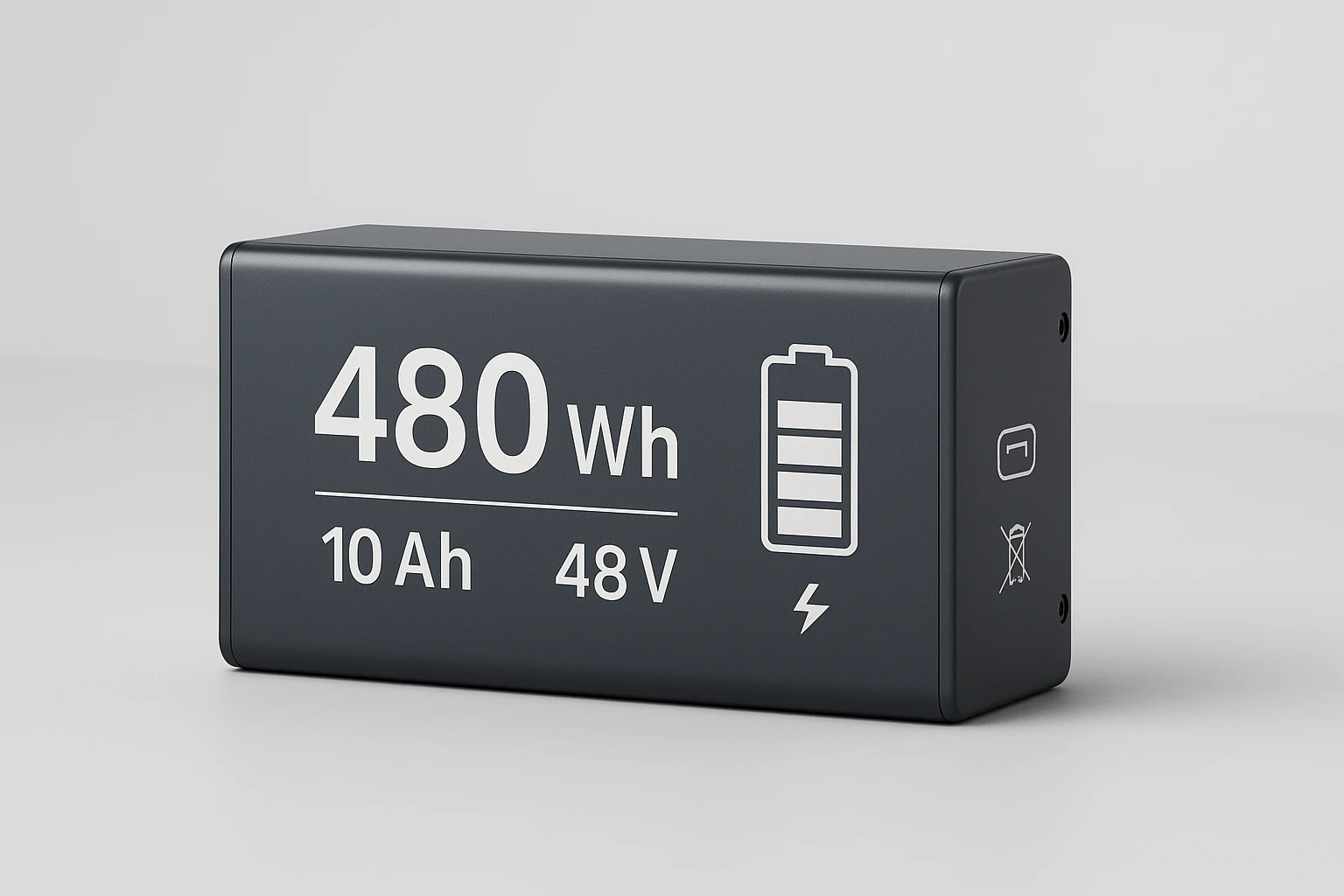
  • Nominal capacity: 480 Wh
  • Usable assumption: 90% → 432 Wh
  • City pace consumption: 18 Wh/mi (≈ 11 Wh/km)
  • Mixed route consumption: 22 Wh/mi (≈ 14 Wh/km)

City range: 432 ÷ 18 = 24.0 mi (≈ 38.6 km)
Mixed range: 432 ÷ 22 ≈ 19.6 mi (≈ 31.5 km)

These are estimates, not promises. Headwinds, heavy loads, hills, and low temperatures reduce range. Aggressive riding does the same.

Pro move: Track your own Wh/mi (or Wh/km) for a few commutes. Then, plug your personal number into the formula for tight predictions.

Reading Spec Sheets Without Getting Tricked

Marketing language can stretch truth. Here’s how to read carefully.

Red flags:

  • Only Ah is listed, but Voltage is missing. You can’t compute Wh without V.
  • Only “peak power” is shown, with no “continuous” rating.
  • No stated operating temperature ranges.
  • Vague claims like “up to X miles” with no rider weight or speed context.

What to look for:

  • Pack Wh and nominal V together.
  • Cell chemistry (e.g., NMC or LFP) and configuration (e.g., 13s2p), when available.
  • Charge rate and charger output (A, V, or W).
  • BMS protections and any thermal cutoffs.
  • Operating and charging temperatures (°F/°C). For most packs:
    • Storage: about 50–77 °F (10–25 °C)
    • Charging: roughly 50–113 °F (10–45 °C)
    • Riding: broader, but efficiency drops in cold.

Bonus sanity check: If a product lists huge range but modest Wh, run the math. If the claimed distance requires implausibly low Wh/mi, treat it as a best-case marketing number.

Care, Charging, and Storage for Maximum Usable Capacity

Good habits preserve more energy day to day and slow long-term aging.

Daily charging

  • Charge to ~80–90% for routine use when possible.
  • Avoid waiting until 0%; recharge around 20–30% SoC.
  • Let the pack cool to room temp before charging after a hard ride.
  • Use the OEM charger and avoid mismatched third-party units.

Storage

  • Store near 40–60% SoC if unused for weeks.
  • Keep it in a cool, dry area: about 50–77 °F (10–25 °C).
  • Check and top up monthly to maintain the storage window.

Riding and maintenance

  • Keep tires properly inflated to reduce rolling losses.
  • Smooth throttle inputs reduce voltage sag and heat.
  • Keep connectors clean and dry; moisture raises resistance.
  • Update firmware where applicable to ensure correct BMS behavior.

Safety first: Charge on a hard, non-flammable surface, away from bedding or clutter. Use a nearby smoke alarm. Never leave charging unattended.

Quick Comparison Table (Example Data)

The following generic table illustrates how nominal Wh translates into estimated usable Wh and range. It assumes a 90% usable window for easy math. Real results vary.

Example PackNominal WhAssumed Usable Wh (90%)City Range @18 Wh/mi (≈11 Wh/km)Mixed Range @22 Wh/mi (≈14 Wh/km)
Pack A36032418.0 mi / 29.0 km14.7 mi / 23.7 km
Pack B48043224.0 mi / 38.6 km19.6 mi / 31.5 km
Pack C56150528.1 mi / 45.2 km23.0 mi / 37.0 km

How to use this: Find your pack’s Wh, apply a buffer (10–20% is common), then divide by your personal Wh/mi or Wh/km. If you ride fast or climb hills, use a higher consumption number.

FAQs

1) Why does my scooter “die” with 10% left?
That bottom buffer protects the pack from over-discharge. Voltage sags under load near empty, so the BMS may shut down early to keep cells safe.

2) Is charging to 100% bad?
Occasional full charges are fine. However, parking at 100% for long periods stresses cells. For daily use, many riders target 80–90%.

3) Do cold temperatures reduce usable capacity?
Yes. Cold slows the chemistry, raises resistance, and increases voltage sag. You’ll see lower usable Wh and shorter range until the pack warms.

4) Wh vs Ah: which matters more?
Wh is better for energy comparisons because it includes voltageBattery Wh vs Ah debates usually vanish once you compute Wh.

5) Can I unlock more usable capacity through settings or firmware?
Some devices let you adjust behavior slightly. Still, the BMS keeps strict safety limits. Expanding the window risks cycle life and safety.

6) What’s a safe storage charge?
About 40–60% SoC in a cool room. Check monthly and adjust.

7) Does fast charging ruin batteries?
Not immediately. However, higher C-rates increase heat and long-term wear. Use them when needed, not every day.

8) Why does my range shrink over time?
Normal aging reduces capacity and increases internal resistance. Your usable window narrows under load, so range falls gradually.

Glossary (Plain English)

  • Wh (Watt-hours): Total stored energy.
  • Ah (Amp-hours): How much current the pack can deliver over time.
  • Voltage (V): Electrical pressure that pushes current.
  • C-rate: Charge or discharge current relative to pack capacity.
  • DoD (Depth of Discharge): Portion of the pack you’ve used since full.
  • SoC (State of Charge): Current fullness as a percentage.
  • BMS (Battery Management System): Electronics that protect and manage the pack.
  • Energy density: How much energy fits per unit weight or volume.
  • Cycle life: How many charge/discharge cycles before meaningful capacity loss.
  • Cell balancing: Keeping cells at similar voltages to avoid weak links.
  • Cut-off voltage: The BMS’ stop line to prevent damage.

Final Thoughts

Nominal capacity tells you what’s printed on the label. Usable capacity tells you what actually powers your ride. Because conditions vary, smart riders estimate conservatively, track real consumption, and care for their packs. When you want to see how features translate to road feel, skim hands-on impressions in our Electric Scooter Reviews. Finally, use Wh-based math, dial your speed to match your route, and let good habits stretch both range and battery lifespan.

The Best Personal Finance Apps That Actually Make a Difference

Daily writing prompt
What place in the world do you never want to visit? Why?

Managing money isn’t always easy—especially when juggling bills, debt, savings, and spending. Many Americans find it hard to keep up, and that’s where Albert comes in. Designed as an all-in-one finance assistant, Albert makes budgeting and money tracking simple and stress-free. 

It works from your mobile phone, giving you access to your finances anytime, anywhere. From creating a smart budget to helping you pay bills and reduce debt, Albert packs everything into one clean platform. You can get started at https://albert.com/ and learn more. Albert might be your best bet if you’re looking for a tool that simplifies your money life.

Finance app concept illustration

source

The Simplicity of Smart Budgeting with Albert

Albert is built for users who want to manage their finances without feeling overwhelmed. Many other apps only focus on money manager expense tracking or savings. Albert does more. It combines key features that help handle money, build a budget, and plan long-term financial goals.

One of Albert’s standout features is the personalized spending plan. After connecting your bank accounts, Albert looks at your monthly income, fixed expenses, and spending habits. Then, it creates a plan that fits your lifestyle. The app breaks down what you can safely spend and what you should save. With clear visuals and a friendly layout, you get a real understanding of where your money goes.

How Albert Stands Out Among Many Best Budgeting Apps

There are several budgeting apps out there, but very few offer the flexibility and intelligence that Albert does. While some apps only track expenses, Albert offers deeper control through custom spending categories and a real-time, empowered personal dashboard.

Albert also includes features like automatic savings, credit reports, and insights on your full cash flow. You’ll see how much you earn, spend, save, and owe—all in one place. The app doesn’t just show numbers—it helps you make decisions. That’s why Albert ranks among the best budgeting tools and finance apps in the U.S.

Online Budgeting Tools That Actually Help

Regarding useful budgeting features, Albert covers all the basics and goes further. It includes:

  • Real-time expense tracking
  • Zero-based budgeting approach to give every dollar a job
  • Automatic sorting to categorize expenses
  • Suggested ways to save based on your past habits

Albert’s tools feel less like software and more like a smart assistant that learns from your patterns. It’s one of the few personal finance tools for budgeting that helps you act smarter with your money instead of just recording it. 

Albert’s Free Version

Not everyone wants to pay for a finance app, especially starting out. Albert offers a free version that gives access to core budgeting tools. You can monitor spending, set savings goals, and get personalized insights without spending a dime.

The free app option allows people to try Albert before deciding if they want more advanced features. This is great for young adults, students, or anyone starting to build their financial knowledge.

Tackling Debt and Improving Your Net Worth

According to the Federal Reserve, over 45% of American households carry credit card debt. Albert helps reduce that burden. The app provides clear suggestions for debt repayment, often based on your available cash and spending habits. You’ll see how much to pay when to pay, and which balances to prioritize.

Albert also tracks your net worth in real-time. It pulls in all your accounts—from checking and savings to loans and investments—and gives you a snapshot of your current position. This big-picture view can be a powerful motivator to save and spend less.

Making Capital Budgeting Easier for Personal Use

While formerly personal capital budgeting analysis tools are often used by businesses, Albert brings similar logic to your everyday money decisions. Are you thinking about buying a car or planning a home improvement? Albert helps you see how that purchase would affect your savings and monthly budget.

These insights are helpful because they stop you from making quick decisions that can hurt your long-term goals. Instead, you can look at the numbers and confidently make smart moves. It’s financial thinking made simple for real life.

Keeping It All in One App

What makes Albert one of the best budgeting tools is how it combines everything in one easy-to-use place. With Albert, you no longer need multiple apps for different tasks. Here’s what you get in one platform:

  • Budget planner that updates in real-time
  • Full connection to financial accounts and credit cards
  • Track spending tools that sort and label transactions
  • Personal budgeting tools for income, expenses, and savings
  • Alerts when bills are due or spending rises
  • Snapshot of cash flow, balances, and upcoming bills
  • You can sort the data as per the account group easily
  • Sync accounts as easily as you can

Everything is designed to keep your financial life organized and on track. You’re not just looking at money—you’re managing it actively.

Albert vs. Other Free Budgeting Apps

Here’s how Albert compares with other budgeting apps:

FeatureAlbertPocketGuardGoodBudgetEveryDollar
Free App Available✅ Yes✅ Yes✅ Yes✅ Yes
Personalized Spending Plan✅ Yes❌ No❌ No❌ No
Monthly Expenses Tracking✅ Yes✅ Yes✅ Yes✅ Yes
Reports for Credit✅ Yes❌ No❌ No❌ No
Zero-Based Budgeting✅ Yes❌ No✅ Yes✅ Yes
Debt Repayment Suggestions✅ Yes❌ No❌ No❌ No
Capital Spending Forecast✅ Yes❌ No❌ No❌ No
Revenue concept illustration

source

Final Words

Albert takes the stress out of personal finances when dealing with multiple accounts. With smart tools, easy-to-understand insights, and flexible budgeting options, it puts absolute control in your hands. Whether it’s paying bills, building savings, or managing credit, Albert makes everything easier—and it all starts with a single app on your phone.

FAQs

1. Can Albert help with yearly budgeting too?

Yes. Albert allows long-term planning, not just monthly breakdowns. You can set annual savings goals and track performance throughout the year for smarter decisions.

2. What happens if I overspend my budget with Albert?

Albert sends alerts and helpful suggestions so you can adjust. It also updates your plan automatically to help you stay on track the following month.

Surfer: https://app.surferseo.com/drafts/s/Jw5TkNQCcOLLf0zvCOcAxYr6_JLqrNOH

Plagiarism report: https://i.ibb.co/SXhTGskr/image.png

https://images.surferseo.art/fd668b97-8d62-4563-aedf-b30c698026e6.png

Top 7 Unbelievable British Laws That Are Still In Place Today 

The British legal system is one of the oldest in the world and technology lawyers EM Law have found that there are still some archaic laws on the books which have not been updated to reflect modern life. Here are some of those laws:

Photo by EKATERINA BOLOVTSOVA on Pexels.com

1. Beating carpets on the street

Shaking or beating carpets and rugs in the street is an offence under section 43 of the Metropolitan Police Act 1839, which states: “Every person who shall beat or shake any carpet, rug or mat (other than a door-mat) before 8 am.

Carpets and rugs can ‌release dust and other particles into the air, which can be harmful to people with respiratory conditions.

2. Walks cows down in daylight

Cows are slow-moving animals and they can block traffic if they’re allowed to roam freely on the roads. In England, it is illegal to walk a cow down the street between the hours of 10 am and 7 pm, as stated in the Metropolitan Police Act of 1837.

People will need permission from the Police Commissioner if they wish to walk a cow down the street during those hours.

3. Ringing someone’s doorbell and then running away

Also known as “knock knock ginger” is an offence under the Metropolitan Police Act 189. The law was put in place to prevent people from causing annoyance or disturbance to others.

Playing this game/prank may seem like harmless fun, but it can be very disturbing for the person on the receiving end, especially if they’re elderly or vulnerable.

4. Gambling in a library

Gambling of any kind is prohibited in libraries, as stated in the Library Offences Act of 1898. This includes may include activities such as playing card games, betting on sports games, and using slot machines.

A library is a place of learning and research, so it’s important to maintain a quiet and respectful atmosphere. Gambling can be disruptive and distracting for other library users.

5. Carrying a plank along a public footpath

To prevent public nuisance, section 54 of the Metropolitan Police Act 1839 makes it an offence to “carry any timber, plank, or bar of wood, or any pole, beam, or post along any footway.”

This law was enacted to prevent people from blocking footpaths with large and cumbersome objects. It can be very dangerous and inconvenient for pedestrians, especially if they have to walk on the road to get around the obstruction.

6. Play on icy streets

Sliding on icy streets can be dangerous for both the people involved and passers-by, as declared by section 54 of the Metropolitan Police Act of 1839. While it might seem like a fun activity to take part in, it is also incredibly stupid and reckless to do so because it can cause some serious injuries.

7. Kill a swan

The Queen owns all the swans in open waters in the UK. According to the laws dating back to the 12th century, it is an offence to kill or injure a swan, with a maximum penalty of six months in prison and/or a fine of £5,000.

Swans are protected by law because of their cultural and historical significance. They are also a symbol of the British monarchy.

Conclusion

There are many outdated laws still in place in the UK. Some of these laws date back centuries and are no longer relevant, while others were put in place to prevent public nuisance or protect public safety.

However, some of these laws are still enforced and can lead to fines or even imprisonment if broken, so people should brush up their knowledge regarding these laws to prevent getting in trouble with the police and having to pay big fines.

iTop Screen Recorder – A Fantastic Free Screen Recorder

iTop Screen Recorder - A Fantastic Free Screen Recorder

A free Windows screen recording tool called iTop Screen Recorder has just been released, according to iTop. It has no time limit and no watermark. With it, recording any part of the display is greatly feasible.

Additionally, users may encounter frequent problems while using screen recorders, such as a challenging user interface, a noticeable watermark on films, or a relatively short recording time. Some of these issues were resolved and video recording became fluid with iTop Screen Recorder. When users wish to record video chats, create YouTube tutorials, or capture online gaming highlights, this software elevates screen recording to a new level.

Overview of iTop Screen Recorder?

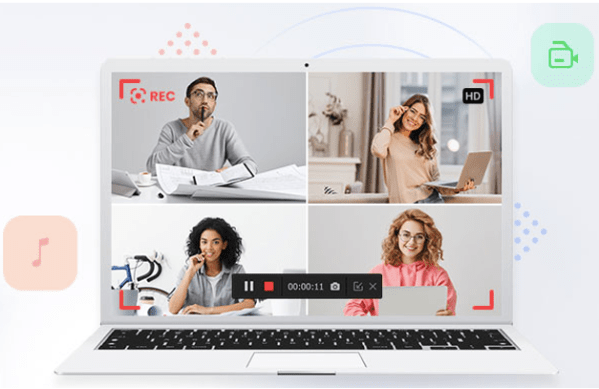
With the webcam, speaker, and microphone turned on, the iTop Screen Recorder records any area of the screen. supports high-quality video with a configurable bitrate, 60 frames per second, and a 4096 by 2160 (HD) video size option.

This screen recorder tool allows video gamers to capture 2D/3-D games in excessively high quality. use a hardware-extended H.264 encoder to improve recording. Users can save audio in formats including MP3, AAC, and AC3 as well as video in common file types like MP4, AVI, FLV, and GIF. It enables you to condense and edit the video before instantly uploading it to YouTube, Facebook, Vimeo, Instagram, Google Drive, and Dropbox.

Great Characteristic

The following features of this software stand out among others:

  • Flexible Screen Capture: You can start recording from any location on the screen. It is possible to record a specific section of the screen in addition to the entire display.
  • Recording from a Web Camera: In addition to being possible to create the regular screen recording that is available on any computer, utilizing a Web Camera also helps. With this option, you might make a wide range of instructional.
  • The movies received are of the highest caliber and are recorded instantly in HD. You could watch movies that were clear and flowing.
  • Screenshots while recording: It is feasible to take one or more screenshots while the recording is going on. Each person can quickly choose the items they require at any time.
  • Numerous output codecs are supported The most popular video codecs can be used to generate videos, and switching between formats is also an option.
  • Audio insertion on the screen: Audio can be used to follow videos. Among other changes, you can use the sounds produced by the gadget or those obtained via a microphone.

Conclusion

The Product Manager of iTop stated, that iTop is committed to disseminating free, simple, and trustworthy tools. Customers requested an eco-friendly, easy-to-use video recorder, therefore we introduced it. I believe that the iTop Screen Recorder will let users capture videos effectively and with enjoyment. Anyone having this software will have no problem with how to record Zoom meeting.

And with the release of iTop Screen Recorder 3.0, this screen recorder provides users with a free video editor, which gives a one-stop solution to edit video and record screens easier and faster.