21st Century Tools: The Role of the Teache

Once again, I refer to Dr. Matthew J. Koehler’s model of TPACK to conceptualize the interconnected and overlapping realms of teacher knowledge. The question posed is concerning the role of the teacher as it pertains to learning and understanding 21st century tools.

The TPACK model shows a breakdown of the areas of expertise teachers are expected to know, including content knowledge, pedagogical knowledge and technological knowledge. According to this model, teachers should strive to reach the middle area where all three realms overlap.
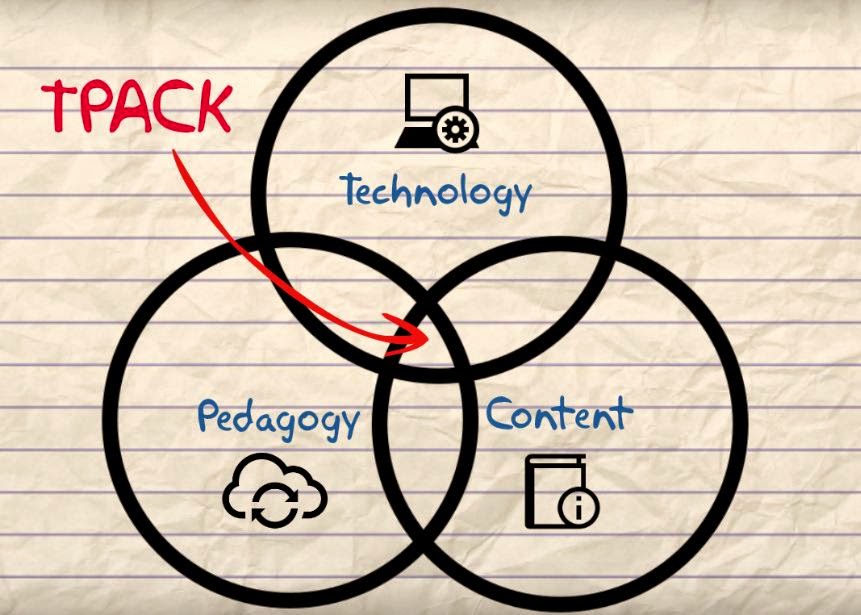
Content Knowledge: this is the information on the subjects we teach.
But I think we can all agree that being an expert in a field does NOT necessarily equate to being a good teacher.

Pedagogical Knowledge: this is ‘the art of teaching’.
It includes such things as taking into consideration learning styles, differentiating instruction, creating a classroom environment and assessment practices. Basically, its your philosophy of education.

Technological Knowledge: this is the tools used to teach.
Today, many people’s immediate thoughts are of modern technologies. However, it can also includes things as simple as a pencil or a calculator.

The overlapping area between content and pedagogy covers the core business of teaching. It is what to teach and the best way to teach it. However, it is often the third realm of technology with its overlapping areas that tends to be the most challenging for teachers.

It’s true, that technology is advancing at exponential rates and there’s no way any one person could keep up with it all.

So how should teachers face the daunting task of learning and teaching with 21st century tools?

First, teachers should remember that technology (including new computer-related software and hardware) are merely tools to use to support student learning. The foundation of teaching still lies in a teacher’s knowledge of the content and their own personal teaching pedagogy. Effective technology integration does not consist of using it as a gimmick or reward for students. Instead, technology should be utilized as a teaching tool for lessons firmly rooted in calculated pedagogy and closely linked to content and curriculum outcomes.

Second, it’s important for teachers to realize that they only need to know enough about new technologies to integrate it into their specific classroom – the same way that we only use teaching practices which fit our pedagogy and content knowledge which relates to our subject. Teachers do not need to be tech experts to effectively use technology in the classroom. Instead, the best 21st century educators know of a tools which fits the context of their teaching, some basic skills of how to use and tool, as well as the courage to try it out!

Third, teachers should remember that a proper education in the 21st century must include teaching and learning with new technology. Educators must equip students with technological skills to be digital citizens and successful in the world. It is the role of the teacher to learn alongside his or her students as technology advances to guide students on their journey and model self-sufficiency when learning about new technologies.

Learning Skills and Work Habits: Tech Tools for Tracking Student Behaviours

The first statement of the Learning Skills section of the Ontario Ministry of Education’s publication Growing Success: Assessment, Evaluation, and Reporting in Ontario Schools states, “The development of learning skills and work habits is an integral part of a student’s learning” (p. 10).

Teachers are expected to report on six categories:
            • Responsibility
            • Organization
            • Independence
            • Collaboration
            • Initiative
            • Self-Regulation
Learning Skills should not be considered in the determination of a student’s grades. Instead, the assessing, evaluating, and reporting on the achievement of curriculum expectations and on the demonstration of learning skills should be done separately.
Though some may identify other skills as being crucial to student success, it is clear that a student’s work habits significantly contribute to their success in school and for life beyond the classroom.
The Definition and Selection of Competencies (DeSeCo) Project, sponsored by the Organisation for Economic Co-operation and Development (OECD), has underlined the importance of identifying and developing key competencies as follows:

Globalisation and modernisation are creating an increasingly diverse and interconnected world. To make sense of and function well in this world, individuals need, for example, to master changing technologies and to make sense of large amounts of available information. They also face collective challenges as societies – such as balancing economic growth with environmental sustainability, and prosperity with social equity. In these contexts, the competencies that individuals need to meet their goals have become more complex, requiring more than the mastery of certain narrowly defined skills.

(OECD, p. 4)

We are preparing students for an information saturated world where they will need to be self-directed learners with the skills to collaborate with others, are organized, have initiative, and set and monitor personal goals. As educators it is our responsibility to foster and help develop these skills in our students.
When it comes time for report card data entry, our tracking should be consistent and accountable to result in accurate reporting of students’ learning skills and work habits.
The following are three simple tools for tracking students behaviours for the reporting of learning skills:

See the slides here.

Reaching the Visual Learner: Software to Create Digital Posters or Infographics

Ever find yourself drawing incomprehensible doodles as you attempt to explain an idea to a student? I do all the time.

There is no doubt in my mind that I am a visual learner. I see this come out in my teaching, as I break down complicated ideas for my students in the same way I did to make sense of it for myself. Taking large amounts of text and synthesizing those ideas to create an aesthetically pleasing, symbol-saturated visual representation is something I truly enjoy doing.

Source: OnlineCollege.org

See my Pinterest board for resources to make digital posters or infographics as well as editing programs for photo manipulation:

Cris TurpleDigital Posters/InfographicsFollow On

Email ThisBlogThis!Share to TwitterShare to FacebookShare to Pinterest

Flipping the Classroom: Don’t Re-Invent the Wheel, Find Pre-Made Video Resources Online

There has been a lot of talk lately around the theory of ‘flipping the classroom’. Essentially, students preview lesson material and lectures at home to make time to do more hands-on, collaborative activities in class.
Watch the following short video or view this infographic for more details.
Source: Center for Teaching and Learning

However, what teacher has the time to create a high quality video for each lesson?

Allow me to be so bold as to say: no teacher.

Though I have seen success from teachers who simply record themselves teaching a lesson at the front of the class or from an aerial view then posting it in a place students can access such as on YouTube or school LMS. This simple act allows the student to pause or rewind any confusing parts of a lesson which promotes self-regulation in the learner.

Further, I have also seen success from teachers who record their screens during a lesson using tools such as EduCreations or the recording feature on SmartBoards. What’s great about this format is the accompanying online learning community of educators who have posted their own lessons to share. You could further check out places such as OpenEd or Share My Lesson for lesson sharing in a video format.

Flipping the classroom has many benefits: instead of students listening to a transmissive, passive lecture, teachers can utilize the collaborative environment of the classroom by guiding cooperative and exploratory tasks. It also frees up the teacher’s time to provide personalized instant feedback to students and differentiate instruction by pulling small groups of learners to work with.

However, there are many problems to the flipped classroom as well. What if the students don’t do their homework? What if there were technology issues? What if every subject teacher expected a student to learn lesson content the night before (how many hours of homework is that??)

The more prominent downfall I spotted in my sideline analysis of the flipped classroom is that student grew tired of the format. Making an educational video entertaining is a hard feat! Creating even a simple animation or instructional video to accompany or substitute a face-to-face lesson takes much effort and time on the teacher’s part.

What I realized is that I did not have to create the video myself – what it came down to is finding the best resource to fit my teaching needs. Why re-invent the wheel? Luckily there are many free educational video resources available online.

Cris TurpleVideo Resources for LessonsFollow On

I’ve also learned when it comes to the flipped classroom, as with anything, it works best in moderation. I appreciate many educational benefits to ‘flipping the classroom’. But I also am going to teach a lesson in the format which I feel worked best for the topic and my learning goals.

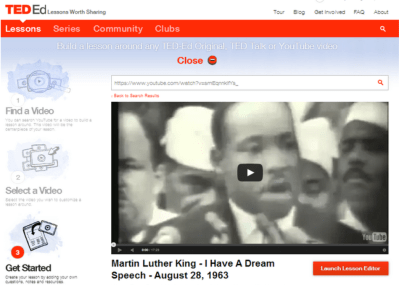
For instance, I chose to flip a lesson during a speeches unit I taught. In this lesson, I had students view Martin Luther King Jr.’s infamous “I Have a Dream” speech at home, identifying literary devices and observing the vocal skills used in the speech. By flipping the lesson, students could view the video as many times as they liked. For the in-class lesson, we discussed the answers in groups and as a class before viewing another video which deconstructs the speech.

I used the extraordinarily user-friendly site Ted Ed Lessons to create this lesson, along with embedded instructions, formative assessment , and discussion forum.

The website sends the lesson creator a link to view what students have started the lesson and to review progress. Other teachers can also customize the lesson to suit their needs.


Alternatives to PowerPoint: Web-Based Presentation Slide Programs

I used to teach Grade 8 English for 90 students. That meant whenever there were class presentations….I watched 90 of them. Thus, one would understand why I absolutely refused to let my students create boring, unengaging presentations using static, simple technology.

I didn’t restrict what software my students could use, rather I restricted what they couldn’t use by banning PowerPoint.

However, I learned as a teacher to be sure to direct students to programs that fit the criteria of the assignment. Since my oral presentation had to include a live speaking portion, students who chose the PowToons option were left starting and stopping their video. You can imagine how NOT smooth my nervous 13 year old students were in doing this in front of an audience of their peers.
When providing options for students to create a presentation, it makes sense to me to seperate technology by presentation slides and presentation videos.
See my review of various technology to create slides (could also be used as a student resource):

To create short videos or animations to accompany presentations, see my Pinterest board of Video Creation Resources:

Utilizing the Tech You Have: Mobile Devices in the Classroom

    1. Consider the digital divide – will some students be left out not owning a device?


    1. Co-create a clearly defined set of rules with students which compliments the school’s established Responsible/Acceptable Use Policy.


    1. Practice using devices in group settings first to ensure students are familiar with the technology and can effectively use it.


  1. Ongoing reflection of your teaching practice: Is the use of technology modifying or transforming the learning task?


There are many softwares which support the use of mobiles in the classroom. The following are not limited to use with mobiles, but can easily be integrated into a BYOD setting:

Exploring Culture, Identity, and Representation through Art Education

ploration of culture, identity, and representation. This realization was particularly important to explore on a more meaningful level in the multicultural learning environment of my school.


How are educators to challenge the assumptions surrounding culture?

How will we decide whose voices will be heard?

One approach to facilitate learning surrounding culture and identity is through art education. Art can provide us with a tangible object to discuss intangible concepts of identity, and help bring words and understanding to such abstruse constructs. Art is experienced through the senses and acts as a window into cultural representation. The representational power of art is intertwined with the interpretation of symbols used to communicate cognitive processes that are unique to each person. The creation of art can also be used to help students construct meaning surrounding culture and identity.

As an art educator, Stacy Friedman explores issues of racism through puppetry. She has students design, create and script puppets with a commentary on conflicts surrounding identity representations. She notes that the puppets “serve as sort of metaphorical Trojan horses helping us to enter into uncomfortable discourse through a seemingly benign medium” (2). Friedman’s intent is that the puppets open up a door to higher critical thinking and have the potential to become a mechanism for exploring the thoughts and voices of others. Art is an individual encounter based on the mental filters and prior experiences of a specific person.


French artist JR’s street art toys with identity by challenging preconceptions and reductive images propagated by advertising and the media. He work can be found in war-torn and conflict ridden areas of developing countries. JR snaps black and white portraits of local people and literally pastes blown up paper photocopies of these images in the streets. Powerful images of women were pasted around a slum in Kenya, Israeli and Palestinian portraits were placed next to one another in the Middle East, and portraits lined the streets of poor areas of India. JR does not explicitly explain the meaning of his art but instead allows the audience to interpret the art themselves by collecting the stories of those featured in his portraits. He also notes that his projects aid in the construction of his own mindset regarding culture and identity.


Shouldn’t students become producers of art as an alternative to the traditional 

consumption-centred model to emancipate students from media bias 

and offer a different perspective of how meaning is created?

Authorship of media texts and tangible art can be applied to forms of critical analysis that “open up alternative positions from which students can think, debate, act” (3). Not only can art serve as a surrogate of abstract ideas surrounding culture, but the “truths” about identity and culture can be interrogated and constructed through the production of artifacts.

  1. Banks, J.A., Banks, & McGee, C. A. (1989). Multicultural education. Needham Heights, MA: Allyn & Bacon.
  2. Friedman, S. (2004). Responsibility and re/presentation: Reflection on digital video and puppet-based inquiry.
  3. Goldfarb, B. (2002). Students as producers. Visual pedagogy: Media cultures in and beyond the classroom (pp. 57-83). Durham: Duke University Press.

Using the Power of the Internet to Connect People

Online performance artist Ze Frank’s discusses his “web playroom” in the video below. Traditionally, art endevours have been transmissive and do not involve the audience, whereas Ze Frank utilizes technology to connect humans to one another. What resonated with me was his pursuit “to feel and be felt.” This is not a new idea, but rather a long time need for humans which has been augmented by the development of new technologies. It is a concept I think our Generation Z students struggle with on a daily basis.

I find the idea of interactive art is very common in Asia. Around the city there are frequently art exihibtions which encourage interaction from the audience. Holiday decorations are even built as small cities meant to be walked through and experienced. Last November, there was a participatory show in Hong Kong called MURS described as an immersive, interactive outdoor Smart show.

This show really hit home with me because it brought a crowd of complete strangers together in an engaging manner. In a city like Hong Kong, with one of the highest population densities in the world, a place where you are NEVER alone (quite literally unless you are in your home) there is an overwhelming sense of disconnect among the people. I still cannot believe how lonely it can feel standing in a large crowd of people. Hong Kong is a city always on the go: people are in a rush to commute, aggressive to close a business deal, storefronts and buildings are in a constant renovation cycle, and the workforce is transient. All these factors contribute to a place where no one feels grounded and are aching to connect. I think this is one of the reasons an interactive show like this was so popular, and why art which brings people together goes viral.

In my eyes this is one of the greatest capabilities of new technologies for educational purposes. Teachers can transcend the walls of their classrooms to reach audiences around the globe. I have long been a fan of Dr. Ruben Puentedura’s SAMR Model which helps educators to think about HOW they are using technology.

Is a technology just a different way of doing the same old task or it is adding something and transforming the learning experience? 

I often refer back to this model when working with teachers to help them move up the ladder. Technology seems a bit less daunting when there are clear goals laid out to assist tech integration.

Email ThisBlogThis!Share to TwitterShare to FacebookShare to Pinterest

Gamifying Education: Not Just Playing Video Games

The observed motivators which engage children in free play are tantamount to the key elements found in games (1). Further, it is no question that video games are a dominant entertainment form in the twenty-first century and have the capabilities to engage users (2). Such game mechanics are beginning to be applied outside the immersive environments of games themselves, to create engaging experiences for participants in the real world. Gamification is the concept of applying game-design thinking and game elements to engage users in solving problems and increase users’ self contributions (3).

The gamification of education is NOT just playing video games in the classroom – sometimes it doesn’t involve digital technologies at all.

Research reveals that the longer students stayed in school, the less likely they are to attend and feel engaged in their classes (4). Yet, game players regularly exhibit persistence, risk-taking, attention to detail and problem solving skills – all behaviors that would be ideal for students to possess in the classroom. Games are important as they embody four elements associated with how people learn; games are “immersive, they require players to have goals and make frequent decisions, they adapt to each player, and they unfold within the context of a community that supports the social dimension of learning” (5). Through the new media literacies of play and performance, players of games have the capacity to experiment with their surrounding as a form of problem solving, and can practice improvisation from varying perspectives (6). Guiding learners through the curriculum by encouraging thought and action is the foundation of intellectual engagement and aids students in the development of original work, collaboration, and confidence as knowledge-builders (4).

I synthesized my understanding of academic literature to create this visualization of the key elements of gamification:

Special thanks to @TyRiddick for his input.

The gamification of education supports the constructivist theory where knowledge is not simply transmitted from teacher to student, but actively constructed by the mind of the learner (7). Games allow for role play and the immersion in experience through situated practice (8). Well-designed games allow for players to “construct understanding actively, and at individual paces, and. . . enable players to advance on different paths at different rates in response to each player’s interests and abilities, while also fostering collaboration and just-in-time learning” (1). Since the cycle between choice and result is much shorter in games than in life, hypotheses are regularly tested and refined, lowering the emotional stake of failing and encouraging risk taking (6). With this increased willingness to experiment, players continue to make choices, contextualizing facts and information as tools for problem solving (9). The intrinsic motivations instilled in players of games is only increased through extrinsic positive or negative reinforcements such as awards, achievements, or loss of power often found in games. This sort of operant conditioning affects the users’ choices if faced with a similar scenario later in the game (10). Students are forced to use their power of reasoning to construct knowledge for themselves when immersed in a game, no matter their age. The relevance of these capacities beyond a games context, form the basis of a modern literacy that should be developed by all young people.

See my (first) stop-motion video explaining the four principle elements in game that make them engaging to users:

James Paul Gee is a psycholinguistics researcher who has crossed over into literacy and learning. His book “What Video Games Have to Teach Us About Learning and Literacy” is an excellent account of gaming principles and discuses how these elements can be applied to the k-12 classroom.

Again, gamification is not playing video games – it in the idea that the elements of video games can be applied in other areas.

See the video below for an overview of his work:

  1. Klopfer, E., Osterweil, S. and Salen, K. (2009). Moving learning games forward: Obstacles, opportunities & openness. The Education Arcade. Cambridge, MA: MIT Press.
    2.Prensky, M. (2001). Chapter 5: Fun, play and games: What makes games engaging. Digital Game-Based Learning. New York: McGraw-Hill.
  2. Deterding, S., Sicart, M., Nacke, L., O’Hara, K. & Dixon, D. (2009). Gamification: Using game design elements in non-gaming contexts. Vancouver: CHI.
  3. Willms, J. D., S. Friesen, & P. Milton (2009). What did you do in school today? Transforming classrooms through social, academic and intellectual engagement — First national report. Toronto, ON: Canadian Education Association.
  4. Mouza, C. and Lavigne, N. (eds). 2013. Chapter 1: Emerging technologies for the classroom. Explorations in the Learning Sciences, Instructional Systems, and Performance Technologies. New York: Springer Science and Business Media.
  5. Jenkins, H. (2009). Confronting the challenges of participatory culture: Media Education for the 21st century. Cambridge, MA: MIT Press.
  6. Piaget, J. & B. Inhelder (1967). A child’s concept of space (F. J. Langdon & J. L. Lunzer, Trans.) New York: Norton (Original work published 1948).
  7. New London Group. (1996). A pedagogy of multiliteracies: Designing social futures. Harvard Educational Review. 66(1), 60-92.
  8. Gee, J.P. (2003). What video games can teach us about literacy and learning. New York: Palgrave-Macmillan.
  9. Skinner, B. F. (1953). Science and human behavior. New York: Macmillan

Finding Free-to-Use Content for Multimedia Projects

I once tried what I thought was a fantastic idea as an English teacher: have students create a movie trailer for a book they had read to present to their classmates. Students did an excellent job carefully piecing together images, footage and background music using a variety of editing software. When they presented in front of their peers, we filmed their presentations and posted them privately on YouTube.


Then YouTube took down the majority of my students’ videos 
for copyright infringement. Oops.

I had to backtrack and learn more about copyright laws and teach this information to my digital citizens:
I also created a student-friendly printable “cheat sheets” to help students find content for their multimedia projects:
Please feel free to copy these materials and use them for educational purposes.